

Why should I use the new Titan SDK?
Migrating to the Titan SDK ensures your app is ready for the next generation of Titan OS devices and capabilities. It replaces the legacy DeviceInfo API with a forward-looking SDK that supports multi-brand compatibility and enables integration with new platform features including Text-to-Speech, Text Magnification, and App Control.Get started with Titan SDK
1
Compatibility check
Ensure your device is compatible with the SDK by checking the Platform Specifications.
2
Install the SDK
Install the SDK into your project using npm.
3
Import and initialize the SDK
Import the getTitanSDK function from the package and call it to get your SDK instance.
For projects not using a build system, a CDN-based integration is also available. Please refer to our CDN Integration Guide for more details.
Supported brands and models
The Titan SDK is designed to support all TVs powered or maintained by Titan OS, offering a consistent integration experience across brands and devices. Today, this includes:- Selected Philips TVs from 2020 models
- Selected JVC TVs starting from 2025 models
Accessibility
The SDK provides tools to integrate Text-to-Speech (TTS) and Text Magnification. These features are part of our ongoing effort to make TVs more accessible and to comply with the European Accessibility Act (EAA) requirements. Accessibility support is initially available on:- Philips 2025 models
- JVC 2025 models
App Control
App Control allows your application to interact with and launch other applications on the Titan OS platform. This feature, while not new, is now fully integrated into the Titan SDK, initially providing the capability to open other apps. For more information, please visit our App Control page.Migration from DeviceInfo API to Titan SDK
To help you transition from the DeviceInfo API to the new Titan SDK, we have prepared a dedicated migration guide and practical code examples. Visit our Migration to Titan SDK page to get started.Dictionary
The library exposes a structured set of objects and functions to interact with the Titan OS environment. In this section, you’ll find a detailed dictionary of key components, organized for easier reference.Device Information
getDeviceInfo() Return Properties
The
getDeviceInfo() function returns an object containing information about the device’s channel, product details, and some high-level capabilities. Below are the properties you can expect from the returned object:
Accessibility
App Management & Remote Control
TypeScript
The Titan SDK includes full TypeScript support. All types are bundled with the npm package, so you’ll get autocompletion and type-checking right out of the box.Real-World Examples & Resources
To see these features in action and to understand more about the integration, in addition to the following next pages listed at the end of this page, explore the following examples on GitHub:- Example 1: Exploring Device Info: Demonstrates retrieving device information.
- Example 2: Text-to-Speech with Navigation: A fake carousel of movies with TTS speaking the values from the ‘aria-label’.
- Example 3: Text Magnification: Applies text magnification to labels`.
- Example 4: App Control: Applies text magnification to labels`.
- Example 5: Typescript: Carousel of movies with Typescript`.
- Example 6: Hello Titan
- Example 7: Exploring Device Info
- Example 8: Text-to-Speech
- Example 9: Text-to-Speech with text content
- Example 10: Text-to-Speech with Navigation
- Example 11: Text Magnification
Content Security Policy (CSP)
If your app uses Content Security Policies (CSP), you might need to allow our domain. Our SDK connects to services on*.titanos.tv (like for crash reports or updates). Please add *.titanos.tv to your CSP’s allowed connections (e.g., connect-src) to ensure everything works smoothly. This helps avoid issues where your app might block essential SDK features.
If you have rules for iFrames (e.g., frame-src and child-src), it’s recommended to add our domain to your whitelist as well, but it’s not obrigatory. If your company policies requires to avoid the need of allowing our iFrame, it should not prevent you to use the library, but it will display an error/warning in the logs and some features might be affected, such as the App Conttrol.
known issues
IFA on 2020-2022 Philips devices
IFA on 2020-2022 Philips devices
The IFA (Identifier for Advertising) is currently not being returned for 2020-2022 Philips devices.We are actively working on a solution. In the meantime, please feel free to reach out to us at titan-sdk-support@titanos.tv if you require guidance on addressing this issue temporarily.
supportDolbyAtmos property discrepancies
supportDolbyAtmos property discrepancies
The Capability.supportDolbyAtmos property, returned by the getDeviceInfo function, has the following behaviors:
- 2020-2023 devices: Returns “unknown” instead of a boolean value.
- 2024 NT676 and 2025 NT690 4K models: Returns false when it should return true.
firmwareVersion property returns 1.0.0
firmwareVersion property returns 1.0.0
The firmwareVersion property returns invalid data for some devices, such as preventing access to the correct firmware version though SDK.We are currenly working to resolve this issue for the devices affected, but in the meantime, if you want to get this information you can extract it from the user agent. If you decide to do it for the moment, please make sure the implementation covers all the TV brands, as depending on the brand the User Agent structure might change. To see how to extract it, please access the User Agent page.
CSP policies for iFrames error/warning
CSP policies for iFrames error/warning
This issue only happens if your app whitelists domains in the CSP Policies, but should not prevent you to use the Titan SDK. Given that the SDK uses iFrame behind the scenes, CSP blocks one of our components, but then it recover and use another component as a fallback. Our team is working on a new approach for it. For the moment, you can ignore the error.
getDeviceInfo() returns empty or undefined values
getDeviceInfo() returns empty or undefined values
Make sure you are testing your app using DevView, which is our official way to test apps. Please refer to Testing your app for more details.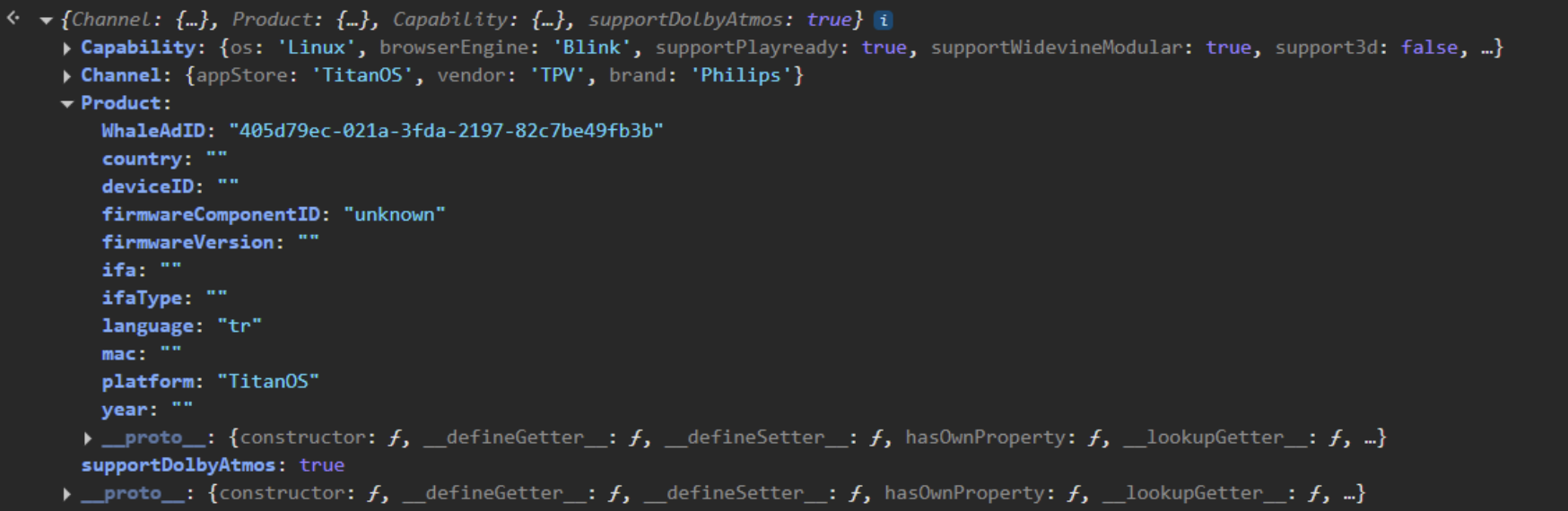
Contact us
We welcome your feedback and encourage you to share any thoughts or suggestions as you test the SDK. Please email us at titan-sdk-support@titanos.tv with your questions or comments.Next steps
Migration to Titan SDK
Learn how to migrate from the DeviceInfo API to the new TitanSDK
Accessibility
Learn how to get started to the new accessibility functionalities in TitanSDK