> ## Documentation Index
> Fetch the complete documentation index at: https://docs.titanos.tv/llms.txt
> Use this file to discover all available pages before exploring further.
# Titan SDK
Titan SDK is a comprehensive library that provides a unified interface for interacting with Titan OS-powered TVs. It simplifies access to core TV features and helps you build apps that run consistently across the expanding Titan OS ecosystem.
This guide will help you integrate the Titan SDK into your applications.
## Why should I use the new Titan SDK?
Migrating to the Titan SDK ensures your app is ready for the next generation of Titan OS devices and capabilities.
It replaces the legacy DeviceInfo API with a forward-looking SDK that supports multi-brand compatibility and enables integration with new platform features including Text-to-Speech, Text Magnification, and App Control.
## Get started with Titan SDK
Ensure your device is compatible with the SDK by checking the [Platform Specifications](https://docs.titanos.tv/platform-versions).
Install the SDK into your project using npm.
```bash theme={null}
npm install @titan-os/sdk
```
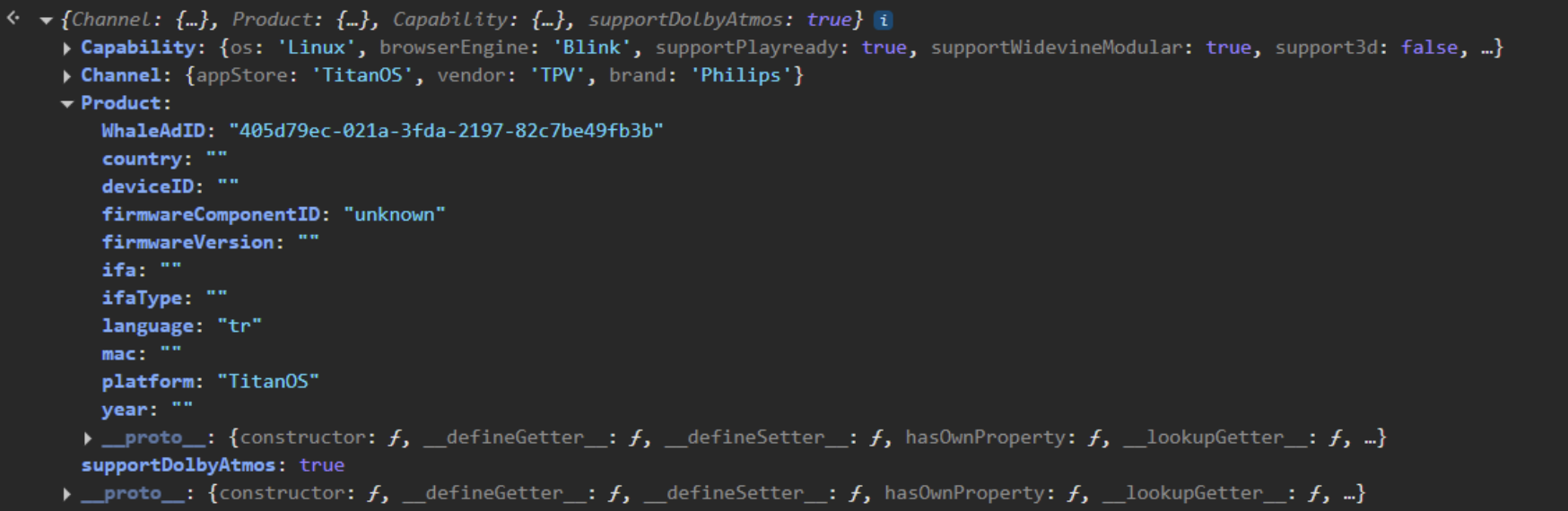
Import the getTitanSDK function from the package and call it to get your SDK instance.
```javascript theme={null}
import { getTitanSDK } from '@titan-os/sdk';
const titanSDK = getTitanSDK();
console.log(titanSDK);
```
For projects not using a build system, a CDN-based integration is also available. Please refer to our [CDN Integration Guide](/titan-sdk-cdn) for more details.
## Supported brands and models
The Titan SDK is designed to support all TVs powered or maintained by Titan OS, offering a consistent integration experience across brands and devices.
Today, this includes:
* Selected Philips TVs from 2020 models
* Selected JVC TVs starting from 2025 models
As Titan OS expands to more brands and devices, the SDK will ensure your app remains compatible with minimal adjustments.
For the most up-to-date list of supported devices and their capabilities, please visit our [platform versions page](https://docs.titanos.tv/platform-versions).
## Accessibility
The SDK provides tools to integrate Text-to-Speech (TTS) and Text Magnification. These features are part of our ongoing effort to make TVs more accessible and to comply with the European Accessibility Act (EAA) requirements.
Accessibility support is initially available on:
* Philips 2025 models
* JVC 2025 models
We are actively working to expand accessibility support to additional features and future models.
For a comprehensive guide on integrating accessibility into your app, please refer to our [Accessibility Integration Guide](https://docs.titanos.tv/accessibility).
## App Control
App Control allows your application to interact with and launch other applications on the Titan OS platform. This feature, while not new, is now fully integrated into the Titan SDK, initially providing the capability to open other apps.
For more information, please visit our [App Control page](https://docs.titanos.tv/app-control).
## Migration from DeviceInfo API to Titan SDK
To help you transition from the DeviceInfo API to the new Titan SDK, we have prepared a dedicated migration guide and practical code examples.
Visit our [Migration to Titan SDK page](https://docs.titanos.tv/migration-to-titan-sdk) to get started.
## Dictionary
The library exposes a structured set of objects and functions to interact with the Titan OS environment.
In this section, you’ll find a detailed dictionary of key components, organized for easier reference.
### Device Information
| Object/Function Name | Type | Description |
| :--------------------------- | :------- | :-------------------------------------------------------------------------------------------------------------------------------- |
| `deviceInfo` | Object | Contains functions to retrieve device-specific information. |
| `deviceInfo.getDeviceInfo()` | Function | Retrieves detailed device information, including hardware and software specifics. Tailor experiences based on these capabilities. |
**getDeviceInfo()** Return Properties
The `getDeviceInfo()` function returns an object containing information about the device's channel, product details, and some high-level capabilities. Below are the properties you can expect from the returned object:
| Property Path | Type | Description | Example Value |
| :------------------------------------ | :--------------------- | :----------------------------------------------------------------------------- | :------------------------------------- |
| `Channel` | Object | Contains information related to the device's channel and app store context. | |
| `Channel.appStore` | string | The name of the application store the device primarily uses. | `TitanOS` |
| `Channel.vendor` | string | The vendor of the channel or platform. | `TPV` |
| `Channel.brand` | string | The brand associated with the channel or platform. | `Philips` |
| `Product` | Object | Contains details specific to the device product. | |
| `Product.platform` | string | The platform name of the device. | `TPN258E` |
| `Product.year` | string | The model year of the device. | `2025` |
| `Product.deviceID` | string | A unique identifier for the device. | `b5778bff-de7f-5688-a815-cbf05a26fed0` |
| `Product.firmwareVersion` | string | The version of the device's firmware. | `058.002.179.041` |
| `Product.firmwareComponentID` | string | The identifier for the device's firmware component. | `TPN258E` |
| `Product.mac` | string | The MAC address of the device's network interface. | `94:bd:be:64:ed:f7` |
| `Product.WhaleAdID` | string | The advertising ID. | `27aa044c-0951-9ee2-9870-676d183a3d12` |
| `Product.language` | string | The device's configured language. | `en` |
| `Product.country` | string | The device's configured country. | `BG` |
| `Product.ifa` | string | The Identifier for Advertisers (IFA) or Device Advertising Identifier. | `883e340c-8877-464a-ab50-68f4ef62f955` |
| `Product.ifaType` | string | The type of Identifier for Advertisers (e.g., `dpid`). | `dpid` |
| `Capability` | Object | Contains flags indicating the device's supported features and technologies. | |
| `Capability.os` | string | The operating system of the device. | `Linux` |
| `Capability.browserEngine` | string | The browser engine used by the device. | `Blink` |
| `Capability.supportPlayready` | `boolean \| "unknown"` | Indicates support for Microsoft PlayReady DRM. | |
| `Capability.supportWidevineModular` | `boolean \| "unknown"` | Indicates support for Google Widevine Modular DRM. | |
| `Capability.support3d` | boolean | Indicates support for 3D content display. | |
| `Capability.supportKeyNumeric` | boolean | Indicates if numeric keys (0-9) are supported on the remote control. | |
| `Capability.supportKeyColor` | boolean | Indicates if color keys (Red, Green, Yellow, Blue) are supported. | |
| `Capability.supportMultiscreen` | boolean | Indicates if the device supports multi-screen functionality. | |
| `Capability.multiaudioSupport` | boolean | Indicates if multiple audio tracks are supported for media playback. | |
| `Capability.TTMLInbandSupport` | boolean | Indicates support for TTML (Timed Text Markup Language) in-band subtitles. | |
| `Capability.TTMLOutofbandSupport` | boolean | Indicates support for TTML (Timed Text Markup Language) out-of-band subtitles. | |
| `Capability.supportUHD` | boolean | Indicates support for Ultra High Definition (UHD) display resolution. | |
| `Capability.supportFHD` | boolean | Indicates support for Full High Definition (FHD) display resolution. | |
| `Capability.supportHDR` | boolean | Indicates support for HDR High Dynamic Range | |
| `Capability.supportHDR_HDR10` | boolean | Indicates support for HDR10 High Dynamic Range. | |
| `Capability.supportHDR_DV` | boolean | Indicates support for Dolby Vision High Dynamic Range. | |
| `Capability.supportMultiAudio` | boolean | Indicates support for multiple audio tracks in general. | |
| `Capability.supportTTMLInband` | boolean | Indicates support for in-band TTML captions. | |
| `Capability.supportTTMLOutofband` | boolean | Indicates support for out-of-band TTML captions. | |
| `Capability.supportAdobeHDS` | boolean \| "unknown" | Indicates support for Adobe HTTP Dynamic Streaming. | |
| `Capability.supportWidevineClassic` | boolean \| "unknown" | Indicates support for Google Widevine Classic DRM. | |
| `Capability.supportDolbyAtmos` | boolean | Indicates support for Dolby Atmos audio technology. | |
| `Capability.supportWebSocket` | boolean | Indicates support for WebSocket communication. | |
| `Capability.supportEME` | boolean | Indicates support for Encrypted Media Extensions (EME). | |
| `Capability.hasStorage` | boolean | Indicates if the device has persistent local storage available. | |
| `Capability.supportAppleHLS` | boolean | Indicates support for Apple HTTP Live Streaming (HLS). | |
| `Capability.supportMSSmoothStreaming` | boolean | Indicates support for Microsoft Smooth Streaming. | |
| `Capability.supportMSSInitiator` | boolean | Indicates support for Microsoft Smooth Streaming Initiator. | |
| `Capability.supportMPEG_DASH` | boolean | Indicates support for MPEG-DASH streaming. | |
| `Capability.drmMethod` | string | The primary Digital Rights Management (DRM) method employed by the device. | `OIPF` |
| `Capability.supportOIPF` | boolean | Indicates support for Open IPTV Forum (OIPF) standards. | |
### Accessibility
| Object/Function Name | Type | Description |
| :---------------------------------------------- | :------- | :-------------------------------------------------------------------------------------------------------------------------------------------- |
| `accessibility` | Object | Provides functions to interact with the TV's accessibility features. |
| `accessibility.isTTSSupported()` | Function | Checks if Text-to-Speech (TTS) is supported and enabled on the current device. Returns `true` or `false`. |
| `accessibility .isTextMagnificationSupported()` | Function | Determines if text magnification is supported by the device. Returns `true` or `false`. |
| `accessibility.getTTSSettings()` | Function | Retrieves the TV's current Text-to-Speech settings, including rate, pitch, and volume, for a personalized auditory experience. |
| `accessibility.getTMSettings()` | Function | Retrieves the TV's current Text Magnification settings, such as zoom levels and text contrast. |
| `accessibility.startSpeaking()` | Function | Initiates Text-to-Speech for a given string, speaking the text through the TV's audio output based on current TTS settings. |
| `accessibility.stopSpeaking()` | Function | Stops any currently active Text-to-Speech output. Allows for control over speech interruption. |
| `accessibility.onTTSSettingsChange()` | Function | Registers a callback for when TTS settings are changed by the user. Enables your app to react to these adjustments. |
| `accessibility.onTMSettingsChange()` | Function | Registers a callback for when Text Magnification settings are changed by the user. Allows your app to update its UI based on new preferences. |
| `accessibility .onTTSConfigurationChange()` | Function | Registers a callback for global TTS configuration changes, such as default voice or language. |
| `accessibility .onTMConfigurationChange()` | Function | Registers a callback for global Text Magnification configuration changes. |
### App Management & Remote Control
| Object/Function Name | Type | Description |
| :------------------------------ | :------- | :---------------------------------------------------------------------------------------------------------------------------- |
| `apps` | Object | Contains functions for overall application management. |
| `apps.launch()` | Function | Initiates the launch of another application. Takes a parameter for the app to be launched, and optionally data to pass along. |
| `getRemoteControlKeyMap()` | Function | Retrieves the current key mapping for the TV's remote control. Understands button to action correlations. |
| `setRemoteControlKeyMap()` | Function | Allows customization or overriding of the TV's default remote control key mapping. Useful for specific app behaviors. |
| `onRemoteControlKeyMapChange()` | Function | Registers a callback when the remote control key mapping changes. Helps your app synchronize with user or system adjustments. |
## TypeScript
The Titan SDK includes full TypeScript support. All types are bundled with the npm package, so you'll get autocompletion and type-checking right out of the box.
```typescript theme={null}
import { getTitanSDK, TitanSDK, DeviceInfo } from '@titan-os/sdk';
const titanSDK: TitanSDK = getTitanSDK();
async function logDeviceInfo() {
const deviceInfo: DeviceInfo = await titanSDK.deviceInfo.getDeviceInfo();
console.log(deviceInfo.Product.brand);
}
```
For more guidance on integrating typescript, please refer to our [Typescript page](https://docs.titanos.tv/typescript).
## Real-World Examples & Resources
To see these features in action and to understand more about the integration, in addition to the following next pages listed at the end of this page, explore the following examples on GitHub:
* **[Example 1: Exploring Device Info](https://github.com/Titan-OS/titan-sdk-examples/tree/master/10-example-npm-exploring-device-info)**: Demonstrates retrieving device information.
* **[Example 2: Text-to-Speech with Navigation](https://github.com/Titan-OS/titan-sdk-examples/tree/master/11-example-npm-text-to-speech-3)**: A fake carousel of movies with TTS speaking the values from the 'aria-label'.
* **[Example 3: Text Magnification](https://github.com/Titan-OS/titan-sdk-examples/tree/master/12-example-npm-text-magnification)**: Applies text magnification to labels\`.
* **[Example 4: App Control](https://github.com/Titan-OS/titan-sdk-examples/tree/master/13-example-npm-app-control)**: Applies text magnification to labels\`.
* **[Example 5: Typescript](https://github.com/Titan-OS/titan-sdk-examples/tree/master/14-example-npm-typescript)**: Carousel of movies with Typescript\`.
Other examples, but using **CDN URL instead of NPM**:
* **[Example 6: Hello Titan](https://github.com/Titan-OS/titan-sdk-examples/tree/master/1-example-hello-titan)**
* **[Example 7: Exploring Device Info](https://github.com/Titan-OS/titan-sdk-examples/tree/master/2-example-exploring-device-info)**
* **[Example 8: Text-to-Speech](https://github.com/Titan-OS/titan-sdk-examples/tree/master/3-example-text-to-speech-1)**
* **[Example 9: Text-to-Speech with text content](https://github.com/Titan-OS/titan-sdk-examples/tree/master/4-example-text-to-speech-2)**
* **[Example 10: Text-to-Speech with Navigation](https://github.com/Titan-OS/titan-sdk-examples/tree/master/6-example-text-to-speech-3)**
* **[Example 11: Text Magnification](https://github.com/Titan-OS/titan-sdk-examples/tree/master/5-example-text-magnification-1)**
## Content Security Policy (CSP)
If your app uses Content Security Policies (CSP), you might need to allow our domain. Our SDK connects to services on `*.titanos.tv` (like for crash reports or updates). Please add `*.titanos.tv` to your CSP's allowed connections (e.g., connect-src) to ensure everything works smoothly. This helps avoid issues where your app might block essential SDK features.
If you have rules for iFrames (e.g., `frame-src` and `child-src`), it's recommended to add our domain to your whitelist as well, but it's not obrigatory. If your company policies requires to avoid the need of allowing our iFrame, it should not prevent you to use the library, but it will display an error/warning in the logs and some features might be affected, such as the App Conttrol.
## known issues
The IFA (Identifier for Advertising) is currently not being returned for 2020-2022 Philips devices.
We are actively working on a solution. In the meantime, please feel free to reach out to us at [titan-sdk-support@titanos.tv](mailto:titan-sdk-support@titanos.tv) if you require guidance on addressing this issue temporarily.
The Capability.supportDolbyAtmos property, returned by the getDeviceInfo function, has the following behaviors:
* 2020-2023 devices: Returns "unknown" instead of a boolean value.
* 2024 NT676 and 2025 NT690 4K models: Returns false when it should return true.
We are currently working to resolve these discrepancies. For the moment, please refer to our [Platform Versions](https://docs.titanos.tv/platform-versions) page to verify Dolby Atmos support for your device.
The firmwareVersion property returns invalid data for some devices, such as preventing access to the correct firmware version though SDK.
We are currenly working to resolve this issue for the devices affected, but in the meantime, if you want to get this information you can extract it from the user agent. If you decide to do it for the moment, please make sure the implementation covers all the TV brands, as depending on the brand the User Agent structure might change. To see how to extract it, please access the [User Agent page](https://docs.titanos.tv/user-agents).
This issue only happens if your app whitelists domains in the CSP Policies, but should not prevent you to use the Titan SDK. Given that the SDK uses iFrame behind the scenes, CSP blocks one of our components, but then it recover and use another component as a fallback.
 Our team is working on a new approach for it. For the moment, you can ignore the error.
Make sure you are testing your app using DevView, which is our official way to test apps. Please refer to [Testing your app](/devviewinstall) for more details.
Our team is working on a new approach for it. For the moment, you can ignore the error.
Make sure you are testing your app using DevView, which is our official way to test apps. Please refer to [Testing your app](/devviewinstall) for more details.
 ## Contact us
We welcome your feedback and encourage you to share any thoughts or suggestions as you test the SDK. Please email us at [titan-sdk-support@titanos.tv](mailto:titan-sdk-support@titanos.tv) with your questions or comments.
## Next steps
Learn how to migrate from the DeviceInfo API to the new TitanSDK
Learn how to get started to the new accessibility functionalities in TitanSDK
## Contact us
We welcome your feedback and encourage you to share any thoughts or suggestions as you test the SDK. Please email us at [titan-sdk-support@titanos.tv](mailto:titan-sdk-support@titanos.tv) with your questions or comments.
## Next steps
Learn how to migrate from the DeviceInfo API to the new TitanSDK
Learn how to get started to the new accessibility functionalities in TitanSDK